 DAILY TAI CHI
How to Set a Daily Reminder for Tai Chi Practice: 3 Ways
This guide shows how to set a daily tai chi reminder using a phone alarm, a calendar alert, or a cue tied to an existing habit, plus how to keep it from fading after the first week.
Published
Quick answer
To set a daily reminder for tai chi practice, pick one steady time, add a repeating phone or calendar alert, and tie it to a habit you already do, like finishing breakfast. A sticky note works too — what matters is that you notice it at the same moment every day.
Key takeaways
- Pick one fixed time each day and set a repeating phone or calendar alert for it.
- Tie the reminder to a habit you already do, like finishing coffee or brushing your teeth.
- One clear alert works better than several scattered ones throughout the day.
- Mornings are usually easiest to protect, though any consistent slot can work.
- Missing a day doesn't break the habit — just let the next alert do its job.
Setting a daily reminder for tai chi practice is as simple as picking one steady time and letting your phone or calendar nudge you toward it, day after day.
If you've downloaded a tai chi app, or simply decided to try a few slow movements each morning, the hardest part usually isn't the practice itself — it's remembering to begin. A reminder closes that gap, turning intention into something that shows up on its own.
What's the easiest way to set a daily tai chi reminder?
The easiest way is to pick a single time slot, add a repeating daily alert to your phone or calendar with a short, specific label, and tie that alert to something you already do — like finishing your coffee — so it rides on a habit you've already built.
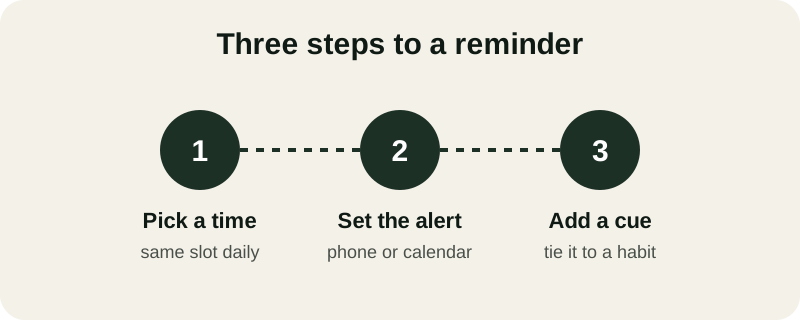
- Pick a time. Choose the same slot every day instead of wanting it to happen "whenever I get to it" — a fixed time is far easier for your mind to expect.
- Set the alert. Most phones let you create a daily repeating alarm or a recurring calendar event — either works, so use whichever you already check first thing.
- Add a cue. Attach the reminder to something you already do automatically, such as right after brushing your teeth or right before you sit down with the news.
If you'd rather not rely on a screen, a sticky note on the bathroom mirror or the coffee maker works just as well as a phone reminder for tai chi practice. A calendar reminder for tai chi works too, especially if you already live by your calendar for appointments. Some people prefer asking a smart speaker to remind them, or sending themselves a recurring text message — any method counts, as long as it's one you'll actually notice.
Best times of day to schedule your reminder
The best time to practice tai chi is simply the slot you're least likely to cancel — and for most people, that's right after waking, before the day fills up with other demands.
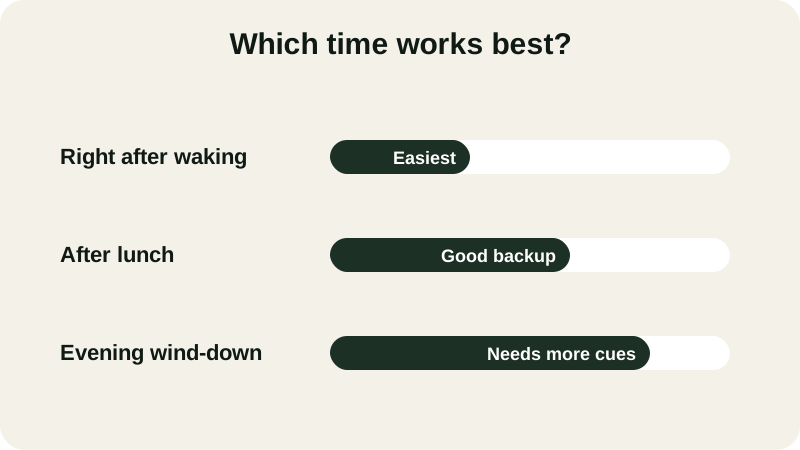
- Right after waking — easiest to remember, before the day gets busy.
- After lunch — a good backup slot if mornings are rushed.
- Evening wind-down — works well but needs a few extra cues to stick.
If a morning slot appeals to you, our 5-minute morning Tai Chi routine is built for exactly that window — short enough to finish before the rest of your day begins.
If you pick a time and find yourself skipping it most days, treat that as useful information rather than a failure. Try shifting the reminder an hour earlier or later, or attaching it to a different part of your routine, and give the new slot a few days before deciding whether it fits.
How do you make a tai chi reminder actually stick?
A reminder sticks when the step right after it takes almost no willpower — such as standing up and doing one slow weight shift rather than committing to a full session. Within a week or two, the cue itself starts to feel automatic.
Pairing the reminder with something almost automatic — standing tall, feet hip-width apart, right where the alert finds you — removes the moment of decision that often stalls a new habit before it starts.
It helps to know roughly how often you're aiming for, too. Our guide on how often seniors should practice tai chi walks through a realistic weekly rhythm, so the reminder matches a pace you can actually keep. If the habit still feels fragile after a few tries, building a tai chi habit in 28 days breaks the process into smaller daily wins you can string together.
Keep a stable chair, wall, or counter nearby when you stand up to practice, move gently, and stop if you feel dizzy or unsteady. Check with a doctor first if you're returning to movement after any health concern.
Combining your reminder with a guided practice
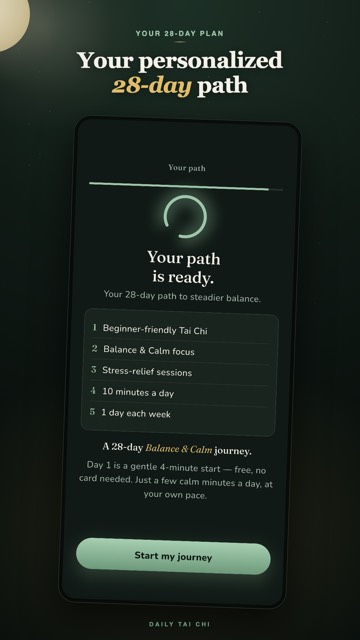
A tai chi reminder app like Daily Tai Chi turns the alert into the first step of the session itself. Open it at your chosen time and it walks you straight into a short warm-up, a main flow, and a cool-down, so there's nothing left to decide once the reminder goes off.
Each session in the 28-day path runs five to ten minutes — short enough to fit right after your morning coffee or just before you wind down for the night. The first four days are free, with no card and no account needed, so you can test whether the reminder-and-practice rhythm suits you.
It's designed for adults 55 and up and works on iPhone and Android, guiding movements like gentle weight shifts and wave hands step by step on a clear, easy-to-read screen.
Getting back on track after a missed day
Missing a day doesn't undo the habit you're building, and it isn't a reason to stop. Simply let the next scheduled alert do its job the following day, without adding a makeup session or doubling up. If you notice the same day of the week keeps slipping — Mondays, say — that usually points to something predictable getting in the way, like an early appointment. Move the reminder earlier on that one day, or anchor it to a different part of your routine, such as right after you get dressed instead of right after breakfast.
However you set it, the real goal of any reminder is simple: get yourself moving for a few quiet minutes today, and let tomorrow's alert take care of tomorrow.
Is there an app that reminds me when it's time for tai chi?
Yes. Daily Tai Chi sends you to a guided session the moment you open it, with a 28-day path of five- to ten-minute sessions on iPhone and Android. The first four days are free, with no card or account required, so you can try the reminder-and-practice combination risk-free.
What if I don't own a smartphone?
A reminder doesn't need a phone. A kitchen timer, a wall calendar with the day circled, or a note propped against your kettle works just as well — what matters is that you see it at the same moment every day, not which device you use.
How many reminders should I set each day?
One well-placed reminder is usually enough. Adding several alerts a day often backfires, since it's easy to dismiss them all without acting. If one time slot keeps failing, move that single reminder to a new time rather than stacking on more alerts.
Can I use a reminder for a seated or chair practice instead?
Yes. A daily reminder works the same way whether you plan to stand or practice from a chair — the cue and timing matter far more than the format. Many people pair the alert with a seated routine on days their joints feel stiffer.