 DAILY TAI CHI
App With Large Text for Tai Chi Instructions (28-Day Path)
This guide explains what makes tai chi instructions easy to read — large letters, high contrast, and a slow pace — and how to set up a comfortable large-text practice space at home.
Published
Quick answer
A tai chi app offering large text instructions shows big, high-contrast letters with spoken cues, so you can follow along without squinting. Pair it with your device's accessibility settings for even bigger menus and timers too.
Key takeaways
- Large, high-contrast text and spoken cues make tai chi instructions easy to follow without squinting.
- Your phone or tablet's accessibility settings can enlarge text system-wide, not just in one app.
- A steady, eye-level screen and a stable chair or wall nearby make reading and moving safer.
- Good lighting matters as much as font size — dim rooms wash out even large print.
A tai chi app with large text turns every instruction on screen into something you can read without squinting — big letters, strong contrast, and a slow pace instead of tiny print and quick cuts.
If you've found yourself holding your phone at arm's length to make out a word, or losing your place mid-move because the screen is busy, this guide walks through what actually makes tai chi instructions easy to read, easy to follow, and comfortable for longer practice.
Why does text size matter for tai chi instructions?
Text size matters because tai chi asks you to read a cue, then move slowly before glancing back at the screen. Small or low-contrast letters make you squint or pause mid-movement, which breaks the easy, unhurried rhythm that makes the practice feel calming in the first place.
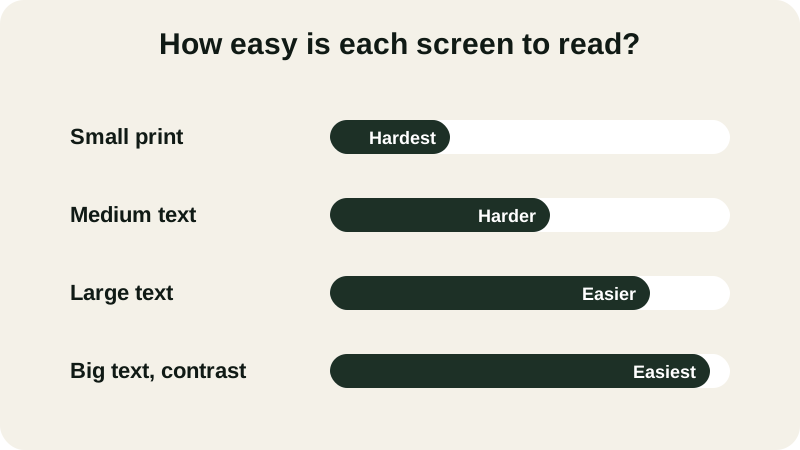
- Small print — hardest to read
- Medium text — harder to read
- Large text — easier to read
- Big text, contrast — easiest to read
Eyes naturally need more light and contrast as the years go by, which is exactly why bold, oversized letters tend to feel so much more comfortable than the small default print most screens ship with. A truly accessible tai chi app for seniors treats this as a design choice, not an afterthought — the cue is big enough to catch from across the room, not just up close. High contrast usually means dark letters on a light background, or pale letters on a deep background; it's worth avoiding pastel text laid over a busy photo, which looks lovely but is hard to read at a glance.
Many people come to tai chi — the slow, flowing style often called meditation in motion — after noticing stiffer joints or a little less steadiness on their feet. The last thing you need is a screen that adds its own strain. Larger letters and simpler layouts mean your eyes can stay on your feet and your weight shifts instead of chasing tiny words across a cluttered display.
Features that make tai chi instructions easier to read
Beyond font size, a handful of design choices decide whether instructions truly feel easy to follow once you're mid-session and your hands are busy.
- Large, high-contrast letters set on a plain background, not laid over a busy video.
- Simple, uncluttered screens that show one cue at a time instead of a wall of text.
- Spoken cues alongside text, so you can listen as well as read.
- Slow, repeatable steps you can pause or replay without losing your place.
- Adjustable pace, so you're never rushed past a word before you've had time to read it.
Device size also plays a part. Here's a quick comparison to help you decide what to prop up during a session.
| Device | Why it helps |
|---|---|
| Phone | Easy to hold and carry, but needs maximized text settings and a steady prop. |
| Tablet | More room for large letters and bigger video, good on a stand or chair tray. |
| Phone mirrored to a television | The largest possible letters, ideal if you already cast video to a TV. |
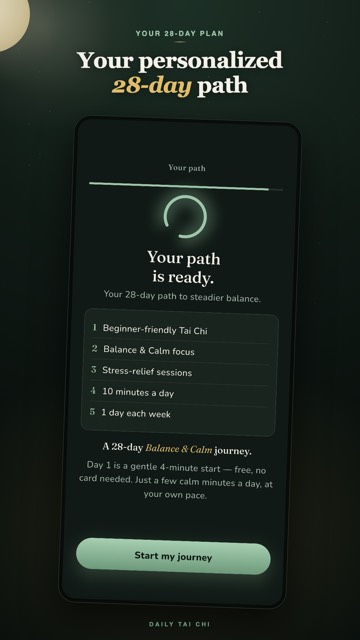
Daily Tai Chi builds its guided sessions around large on-screen cues, spoken instructions, and an easy-to-read layout, available on iPhone and Android as part of a 28-day path of 5 to 10 minute sessions. For a closer look at how one posture breaks down into clear, large-print steps, see our guide to learning tai chi moves step by step.
How do you set up a large-text tai chi practice at home?
Start by enlarging text in your device's accessibility settings, then prop your phone or tablet on a steady surface at eye level in a well-lit room, with a stable chair, wall, or counter nearby before you begin moving.
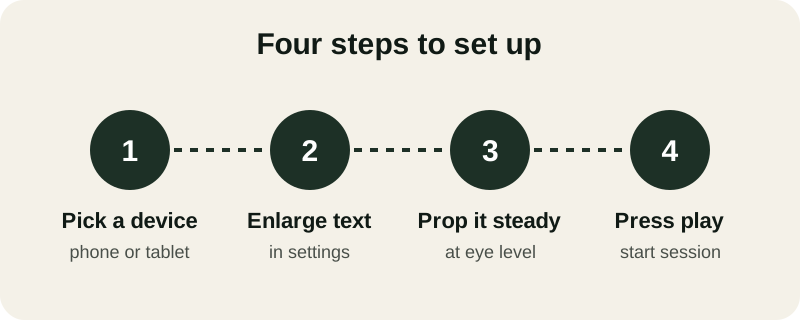
- Pick a device — phone or tablet
- Enlarge text — in settings
- Prop it steady — at eye level
- Press play — start session
Once the screen is set, give yourself a little more room than you think you need. Stand tall, feet hip-width apart, with enough space to let your arms float out to the sides without bumping a lamp, table, or chair. Clear the floor around you too, so the session stays about reading and moving, not stepping around clutter.
Mistakes that make tai chi instructions harder to follow
Even with a large-text app, a few habits can quietly undo the benefit of bigger letters.
- Practicing in dim light, which washes out even large print with glare and shadow.
- Propping the screen too low, so you crane your neck to read each cue.
- Reading in direct glare from a window or lamp, which hides text just as much as dim light.
- Ignoring your device's built-in accessibility settings, which often go further than any single app.
- Rushing past each instruction instead of letting a slower pace do the reading for you.
If you'd like to try a large-text, guided path before deciding on anything, Daily Tai Chi offers the first 4 days free, with no card and no account needed, so you can judge the screen size and pacing for yourself. If stiff joints make standing part of the challenge too, our chair Tai Chi guide uses the same unhurried, easy-to-read approach while seated.
However you set things up, the goal is the same: instructions that get out of the way so you can focus on your breath, your balance, and the slow, steady rhythm of each move. A screen that's easy to read isn't a luxury — it's what lets you relax into the practice instead of working to decode it.
Sources
Can you enlarge text within a tai chi instructions app?
Yes. Most apps respect your device's accessibility settings, so increasing text size in your phone or tablet's settings usually enlarges the app's menus and cues too. Many guided tai chi apps also build in large type and high-contrast screens by default, so you rarely need to adjust anything further.
Is there a tai chi app built specifically with large text?
Yes — Daily Tai Chi uses large, high-contrast cues throughout its guided 28-day path, with sessions of 5 to 10 minutes for iPhone and Android. The first 4 days are free, with no card and no account needed, so you can try the display size before deciding.
Does a bigger screen help more than a phone with big text?
It depends on what's easiest for you to prop up and read. A tablet or larger phone gives more room for large letters, while a smaller phone with maximized text settings still works well if you set it at eye level on a stable surface nearby.
Can you follow tai chi instructions by audio alone if the text is too small?
Yes. Pairing spoken cues with on-screen text means you can follow along by listening if you glance away or the text is briefly hard to read, which takes pressure off your eyes during slower, flowing movements.